We have been closely following the news out of Japan - especially as we left the country less than 24 hours before the major earthquake and tsunami. Since then, they have also been dealing with the scare of a nuclear meltdown. Here are a few resources we are using:
Brainpop - We have a subscription, but they also offer a free video every day. (You can also see this by using an app.) The past few days have been about nuclear energy, though today's is about Mercury as the MESSENGER reached Mercury. This is a great site to help you get background on current events.
CNN Student News - Alex & I really enjoy this 10 minute newscast every morning. They have been doing a great job of covering the news coming out of Japan and the rest of the world.
JASON Mission Project - I signed up for a free account and the "Infinite Potential" course was free. (I did this awhile back, so I'm not sure if everyone can access or not.) I got an email from them today that they'll be having a live podcast about tsunamis. We won't be able to watch it, but I did go to the Infinite Potential course and have started watching the section about tsunamis. I haven't finished it, but will watch it with Alex today. It is Mission 2.
Showing posts with label great web sites. Show all posts
Showing posts with label great web sites. Show all posts
Friday, March 18, 2011

Wednesday, August 18, 2010
CNN Student News Online
Last spring we started watching CNN Student News every morning to keep up with current events. We are excited that they are back after summer vacation! They started their new season on Monday. The videos are only 10 minutes long and the site also includes polls, maps, discussion questions, and more!
Wednesday, May 26, 2010
Alex's President Garfield Presentation Using XtraNormal
(NOTE: YOU CAN SEE ALEX'S VIDEO ON MY BLOG. I'm not sure why it doesn't show up on Google Reader.)
Alex's history assignment for this week was to choose one of these presidents between Lincoln and Teddy Roosevelt and make an online presentation. She chose to use XtraNormal to create a movie about President Garfield. This is something we'd never used before and Alex enjoyed learning how to use it. It's a neat way to add variety to your learning and a great way to share what you've learned!
Alex's history assignment for this week was to choose one of these presidents between Lincoln and Teddy Roosevelt and make an online presentation. She chose to use XtraNormal to create a movie about President Garfield. This is something we'd never used before and Alex enjoyed learning how to use it. It's a neat way to add variety to your learning and a great way to share what you've learned!
Her online history class is now reading book 8 of Joy Hakim's series, A History of Us. This book, subtitled An Age of Extremes, covers the years 1880-1917. One of the chapters we read this week covers the presidents between Lincoln and Teddy Roosevelt.

We have really been enjoying Joy Hakim's books. We have already covered books 6 and 7 this semester. In the next few weeks we will finish about half of book 8 and will continue with the book in the fall.

We decided to grab our book, Smart About the Presidents, to read more about the 9 presidents between Lincoln and Teddy Roosevelt. These pages are brief but have interesting facts and drawings.

We also read about the wives of the 9 presidents in our copy of Smart About the First Ladies.

I also showed her a copy of our new book, America's Presidents: A Museum in a Book. This is a wonderful book that has copies of actual letters, documents, and other papers. Alex really enjoyed this book and flipped through it and read for a long time.
Saturday, May 15, 2010
Seuss' The Butter Battle Book & The Cold War
I have mentioned the Free Technology for Teachers blog several times since I found it a few weeks ago. I am finding so many wonderful resources there! Today he had a post about the Cold War and a book/video by Seuss titled "The Butter Battle Book." The book was written in 1984 and the movie was produced in 1989. It is an alleghory about the Cold War written during the Cold War. We won't be studying this time period until next year, but I went ahead and explained the basics to Alex and we watched the video online. And, that is one reason I love to blog and love Google Reader - I will have this resource saved for next semester and other families might be able to use it, too.
Friday, May 14, 2010
Supply and Demand Fun
Today, Alex's online history class briefly discussed supply and demand. This is something we haven't discussed before, so I went "Googling" for some ideas. Here's what I found:
- Brainpop - video about Supply and Demand
- Lemonade Stand Tycoon and Lemonade Stand Tycoon 2: New York Edition - you can play these free for 1 hour and then pay about $7. Alex has Zoo Tycoon and we really enjoyed Lemonade 2 today.
- A great site called "You Are Here" by the FTC (Federal Trade Commission). If you go to the Food Court, you can learn about to supply and demand, business competition, the history of the FTC, and mergers and monopolies. Some of these areas are games and some are cute animations. One, the history of the FTC, is a nice video. (There are other areas of the mall where you can learn about other subjects.) I HIGHLY recommend this site. It's fun... and educational!

Friday, May 07, 2010
Pollinator LIVE! (a distance learning adventure)
Pollinator LIVE will be hosting a live webcast this Wednesday, May 12th. It is geared for grades 4 to 8 and is the first of a series of live webcasts. This one will be at the National Zoo in Washington, D.C and is titled Insect Zoo in Your Schoolyard. (You do need to go to the site to register, but it is free. And, you can watch a short "test" video to make sure you'll be able to see the live webcast.)


There are also Lesson Plans broken down by age groups which I plan on looking at this weekend. And, if you miss the live class, it will be archived on the Pollinator LIVE site!
P.S. We use BrainPop a LOT and find it to be a great resource, though kind of expensive. They have videos titles "pollination" and "honeybees" that we will watch before Wednesday's webcast. After the movie, they have a quiz, activities, "read more", and Q&A. It'll be a great start to this topic! I also think we'll try to find some pollen to photograph using our digital microscope.
 For younger students, you might try this project I used with Alex when she was barely 5. I adapted it from something I read online at Core Knowledge. I cut out petals and filled a container with Cheetos. Then, I drew a bee on Alex's finger. When her bee visited the flower, it came out with pollen on it!
P.S. We use BrainPop a LOT and find it to be a great resource, though kind of expensive. They have videos titles "pollination" and "honeybees" that we will watch before Wednesday's webcast. After the movie, they have a quiz, activities, "read more", and Q&A. It'll be a great start to this topic! I also think we'll try to find some pollen to photograph using our digital microscope.

Tuesday, May 04, 2010
The Polio Crusade (American Experience)
With Alex being sick today, we ended up watching The Polio Crusade which I had recorded with our DVR. It is another PBS American Experience movie, like The Assassination of Abraham Lincoln we watched a few months ago. Episodes air on our local station on Monday nights. We have also found them at NetFlix.

This was an amazing story. My mom grew up during this time and I talked with her about her experience last time we "studied" the topic of polio about a year and a half ago. My grandfather, her dad, had a mild case of polio.
From the movie, I learned that the March of Dimes started to combat polio. Up until that time, fundraising had relied on rich people giving large amounts of money. This campaign asked each family to send a dime to DC to help stop this horrible disease. It worked! Millions of dollars were raised, and it has changed the way charities raise money even today.
There are more resources online at PBS including a photo gallery, teacher's resources, then & now (about grassroots fundraising), a biography, an interview, and further reading (both books and websites). (And, The Polio Crusade is available to watch online!)
Here are some questions about the film that are on the PBS site. I had Alex answer them, and thought I'd share her answers here.
What is another name for infantile paralysis? POLIO
In what season did polio tend to strike? SUMMER
What rising young politician was stricken by polio in 1921? FDR
Why did polio become a bigger rather than a smaller problem after the adoption of modern sanitation systems? BECAUSE BABIES DIDN'T COME INTO CONTACT WITH THE POLIO VIRUS AND DEVELOP IMMUNITY TO IT
How was polio spread? WATER, PHYSICAL CONTACT, AND SHARING FOOD
What was the March of Dimes? A CHARITY THAT RAISED DIMES FOR POLIO RESEARCH
How did the March of Dimes spread its message among movie audiences? HAD CELEBRITIES LIKE JUDY GARLAND AND MICKEY ROONEY MAKE "COMMERICALS" ABOUT SENDING IN DIMES
Why did many towns use pesticides against polio? THEY WEREN'T SURE WHAT WAS SPREADING THE POLIO AND THEY WANTED TO DO SOMETHING Was this effective? IT WAS NOT EFFECTIVE
What researcher committed to developing a polio vaccine did O’Connor meet on a ship in 1951? JONAS SALK
How was this researcher’s planned vaccine different from other vaccines? HE WAS NOT GOING TO USE A LIVE VIRUS
What researcher was the main opponent of this approach? SABIN
What was the iron lung? A MACHINE THAT HELPED PARALYZED PEOPLE BREATHE
In what year was a major field test conducted of Salk’s vaccine? 1954 What were the results? GOOD - ABOUT 80 TO 90 PERCENT EFFECTIVE
Why did the surgeon general suddenly halt the vaccine program? BECAUSE THERE WAS A BAD BATCH AND CHILDREN WERE GETTING POLIO FROM THE VACCINE
What happened to the number of polio cases in the years after vaccines were widely distributed? IT DECREASED SUBSTANTIALLY
When was Sabin’s vaccine ready? 1962 What advantages did it have over Salk’s? YOU COULD DRINK IT
In what year was polio declared eradicated in the United States? 1973
Last time I posted about polio, I recommended 3 books. I just requested them from the library and I thought I'd list them again here:

From the movie, I learned that the March of Dimes started to combat polio. Up until that time, fundraising had relied on rich people giving large amounts of money. This campaign asked each family to send a dime to DC to help stop this horrible disease. It worked! Millions of dollars were raised, and it has changed the way charities raise money even today.
There are more resources online at PBS including a photo gallery, teacher's resources, then & now (about grassroots fundraising), a biography, an interview, and further reading (both books and websites). (And, The Polio Crusade is available to watch online!)
Here are some questions about the film that are on the PBS site. I had Alex answer them, and thought I'd share her answers here.
What is another name for infantile paralysis? POLIO
In what season did polio tend to strike? SUMMER
What rising young politician was stricken by polio in 1921? FDR
Why did polio become a bigger rather than a smaller problem after the adoption of modern sanitation systems? BECAUSE BABIES DIDN'T COME INTO CONTACT WITH THE POLIO VIRUS AND DEVELOP IMMUNITY TO IT
How was polio spread? WATER, PHYSICAL CONTACT, AND SHARING FOOD
What was the March of Dimes? A CHARITY THAT RAISED DIMES FOR POLIO RESEARCH
How did the March of Dimes spread its message among movie audiences? HAD CELEBRITIES LIKE JUDY GARLAND AND MICKEY ROONEY MAKE "COMMERICALS" ABOUT SENDING IN DIMES
Why did many towns use pesticides against polio? THEY WEREN'T SURE WHAT WAS SPREADING THE POLIO AND THEY WANTED TO DO SOMETHING Was this effective? IT WAS NOT EFFECTIVE
What researcher committed to developing a polio vaccine did O’Connor meet on a ship in 1951? JONAS SALK
How was this researcher’s planned vaccine different from other vaccines? HE WAS NOT GOING TO USE A LIVE VIRUS
What researcher was the main opponent of this approach? SABIN
What was the iron lung? A MACHINE THAT HELPED PARALYZED PEOPLE BREATHE
In what year was a major field test conducted of Salk’s vaccine? 1954 What were the results? GOOD - ABOUT 80 TO 90 PERCENT EFFECTIVE
Why did the surgeon general suddenly halt the vaccine program? BECAUSE THERE WAS A BAD BATCH AND CHILDREN WERE GETTING POLIO FROM THE VACCINE
What happened to the number of polio cases in the years after vaccines were widely distributed? IT DECREASED SUBSTANTIALLY
When was Sabin’s vaccine ready? 1962 What advantages did it have over Salk’s? YOU COULD DRINK IT
In what year was polio declared eradicated in the United States? 1973
Last time I posted about polio, I recommended 3 books. I just requested them from the library and I thought I'd list them again here:
- Dancing with Katya by Dori Chaconas - This is Alexandra's favorite and we've read it twice. It's a picture book about a girl whose little sister develops polio. They used to go out by the pond to dance and the big sister wonders if her little sister will ever dance again.
- Close to Home (Once Upon America book) by Lydia Weaver - This is a fiction book about a little girl whose mom works for Dr. Jonas Salk as they try to find a polio vaccine. One of the little girl's classmates is crippled from polio and another classmate's mom is terrified that her daughter will get polio so they live with all of their house windows nailed shut.
- Healing Warrior: A Story about Sister Elizabeth Kenny by Emily Crofford - This book is a true story about a nurse in Australia who makes up her own method of treating patients with polio... and is successful.
- Small Steps: The Year I Got Polio by Peg Kehret
Monday, April 12, 2010
Supreme Court Learning... with Games! (great site)
One of our relatives is a law professor at KU. Today, she got to meet with former Supreme Court Justice Sandra Day O'Connor. I thought it was a great time to talk about Justice O'Connor and the Supreme Court. So, we started the day by watching two BrainPop videos - Branches of Government and Supreme Court.

(free clipart)
After the videos, I read a short article from Ben's Guide about the Supreme Court and an article about Justice O'Connor's visit to KU.

(free clipart)
Then, we started the really fun part. Justice Sandra Day O'Connor has a great site for Middle School kids called Our Courts. On the site, you can play games and, so far, we've played two of them. The first is called Supreme Decision. In it, you are a clerk to one of the justices and you are supposed to gather information to help the justice decide which way to vote. The case is about a middle schooler who was told by the principal that he couldn't wear a t-shirt which showed a photo and the name of a band. You need to decide if this falls within the students "freedom of speech" right.

The second game we played is called Do I Have a Right? In this game, you open up a law firm and hire lawyers that are experts in different ammendment rights. As the clients walk in, you are to match the client to the appropriate lawyer. This game is a LOT of fun and can be played over and over. You can: hire new lawyers, upgrade their desks to make them more effiicient, add objects to the waiting room to keep your clients from leaving quickly, and run adds to increase your client traffic. Alex and I both played this and, not only did we have a lot of fun, we learned more about which ammendment stands for which right!
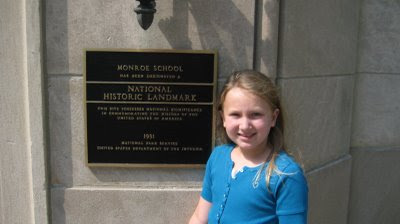
(Alex at Brown v. Board of Education museum, Sept 2008)
Although I had other plans for the week, I think we'll continue working with this website tomorrow. Although I did all of the "teacher's lessons" with the Supreme Decision game, I didn't for Do I Have a Right? So, I want to go back and cover that and also look at the final game entitled Argument Wars. This game will help you learn more about specific cases like Brown v. Board of Education and Miranda v. Arizona.
Friday, March 19, 2010
American Experience by PBS & Lincoln's Assassination
In Alex's online class, we just finished reading about the Civil War and the assassination of Abraham Lincoln. One of the links we were given was to a PBS American Experience video entitled "The Assassination of Abraham Lincoln." It is a wonderfully well done film that looks into the life of John Wilkes Booth, the conspiracy, and the death of Abraham Lincoln and its affect on the United States. The site also includes a Teacher's Resource section with links to other sites and book suggestions.

This page of the website show upcoming shows which are usually aired on Mondays. I'm going to have to start recording these! And, from this page you can watch a lot of the videos in their entirity, though just trailers of some of them. Too bad the episode about building the Golden Gate Bridge is only a trailer! It would have been nice as we prepare for our trip to San Francisco.
P.S. I keep trying to schedule these posts so I can spread them out. But it has only worked a few times. Anyone know what my problem could be???

stock photo
This page of the website show upcoming shows which are usually aired on Mondays. I'm going to have to start recording these! And, from this page you can watch a lot of the videos in their entirity, though just trailers of some of them. Too bad the episode about building the Golden Gate Bridge is only a trailer! It would have been nice as we prepare for our trip to San Francisco.
P.S. I keep trying to schedule these posts so I can spread them out. But it has only worked a few times. Anyone know what my problem could be???
Saturday, February 06, 2010
Customizing Blogger
I have been busy customizing my blog this afternoon. I wanted my posting area to be wider, and I hope my photos will turn out bigger, too. They seem to look better, but I'm not sure if they actually are or not. I found a post titled "How to change width of blogger blogs" at Beginner Blogger Basics. I created a back up of my blog and went through the steps and got a wider blog!
I've also been meaning to post about how I created a custom header several months ago. I know many of you use blogger and already know how to do this, but I hadn't even realized I COULD customize a header with blogger until recently! So, maybe there are others of you out there who could use a short tutorial.

I asked Alex at Serendipity Homeschool and she advised me to go to picnik.com. At Picnik, I downloaded a photo of Alex making a snow angel in the snow. Then, I edited it by cropping it shorter. Next, I went in to "create" and added the text, "school for us." Finally, I "save"d it and typed the width of 800 (as my header width is 820).
I went into the "Layout" on blogger and clicked on "edit header." I deleted the current image and added my new photo. I clicked on the button to use the photo "instead of title and description." And, I had my new header!
Another thing I've been wanting to do is to add a signature to the bottom of each post. I followed the tips at Moms Who Blog and came up with "my" signature! You use My Live Signature to create this signature. When you get to the end, make sure you say you want to "use this signature" and get an html generated. (Oops! I didn't realize it was in a white box, but I've done enough for one day.)
I hope you enjoy my little changes and maybe it will help if some of you were wanting to try some of these changes!

I've also been meaning to post about how I created a custom header several months ago. I know many of you use blogger and already know how to do this, but I hadn't even realized I COULD customize a header with blogger until recently! So, maybe there are others of you out there who could use a short tutorial.

I asked Alex at Serendipity Homeschool and she advised me to go to picnik.com. At Picnik, I downloaded a photo of Alex making a snow angel in the snow. Then, I edited it by cropping it shorter. Next, I went in to "create" and added the text, "school for us." Finally, I "save"d it and typed the width of 800 (as my header width is 820).
I went into the "Layout" on blogger and clicked on "edit header." I deleted the current image and added my new photo. I clicked on the button to use the photo "instead of title and description." And, I had my new header!
Another thing I've been wanting to do is to add a signature to the bottom of each post. I followed the tips at Moms Who Blog and came up with "my" signature! You use My Live Signature to create this signature. When you get to the end, make sure you say you want to "use this signature" and get an html generated. (Oops! I didn't realize it was in a white box, but I've done enough for one day.)
I hope you enjoy my little changes and maybe it will help if some of you were wanting to try some of these changes!
Wednesday, November 25, 2009
CurrClick Black Friday Sale
CurrClick will be having a Black Friday Sale this Friday. They will have lots of FREE products! Last year, I picked up quite a few wonderful products. So, you might want to check it out... this Friday!
Monday, November 23, 2009
Wonderful "New" Blogs
Yesterday, Jill at "History for Children" posted a comment on my blog. So, I went over to her blog to have a look. I love her blog! I actually went through the entire blog in one night!
One of her posts is about a new site that has over 11,000 educational videos. It's called WatchKnow. It links to videos on other sites of the web, but they are pretty well categorized. Alex and I watched a video 'field trip' to the Money Museum in Colorado last night. And, they have A Charlie Brown Thanksgiving posted in 3 parts!
When I really like a blog, I enjoy seeing what that person is reading. You never know when you'll run across another blog you love. And, I wasn't disappointed when I looked at Jill's blogs and came across I.N.K.: Interesting Nonfiction for Kids. This is a blog whose posts are written by children's authors like Loreen Leedy and David Schwartz. Among other things, they talk about their books and speaking in schools.
I really enjoyed the Metric Musings post by David Schwartz, author of Millions to Measure, and Letters...We Get Letters by Susan E. Goodman, author of the Ultimate Field Trip books I just recently heard about and am trying to get from the library.
I hope you enjoy these 2 "new" blogs as much as I am!
One of her posts is about a new site that has over 11,000 educational videos. It's called WatchKnow. It links to videos on other sites of the web, but they are pretty well categorized. Alex and I watched a video 'field trip' to the Money Museum in Colorado last night. And, they have A Charlie Brown Thanksgiving posted in 3 parts!
When I really like a blog, I enjoy seeing what that person is reading. You never know when you'll run across another blog you love. And, I wasn't disappointed when I looked at Jill's blogs and came across I.N.K.: Interesting Nonfiction for Kids. This is a blog whose posts are written by children's authors like Loreen Leedy and David Schwartz. Among other things, they talk about their books and speaking in schools.
I really enjoyed the Metric Musings post by David Schwartz, author of Millions to Measure, and Letters...We Get Letters by Susan E. Goodman, author of the Ultimate Field Trip books I just recently heard about and am trying to get from the library.
I hope you enjoy these 2 "new" blogs as much as I am!
Saturday, November 07, 2009
Homeschool Across America!
I have been reading about a mom and her 9 year old daughter who just spent 6 weeks doing Homeschool Across America. Hmmm... that has me thinking.... (You all KNOW I'd love to do this, right?)
Oh, and I love this video of the daughter, Caroline, tap-dancing across America.
Also, I spent some time this week redoing my labels so that all of my "vacation" posts are on the sidebar together. I also deleted some rarely used labels and reorganized them alphabetically (so the vacation posts would be together) rather than in order of most used.
Oh, and I love this video of the daughter, Caroline, tap-dancing across America.
Also, I spent some time this week redoing my labels so that all of my "vacation" posts are on the sidebar together. I also deleted some rarely used labels and reorganized them alphabetically (so the vacation posts would be together) rather than in order of most used.
Tuesday, October 20, 2009
Learning Multiplication Facts... by Playing Online Games!
We have another website that we've discovered in the past few weeks that we are LOVING. It is called Multiplication.com. Alex LOVES playing on this site.
There are quite a few different games. Two of our favorite games are: Patty's Paints, where you get to "paint" your own car after every round, and Math Models, where you "earn" clothes for your models. At the end of Patty's Paints, you get to race a car around a track! And, at the end of Math Models, you get to use the clothes you've earned to dress your model.
One thing I really appreciate about multiplication.com is that you can choose what facts you are working on. For example, Alex has been working on just her 9 facts for the past week. And, she is getting much faster!!!
There are other things on this site. There are timed quizes so you can compare your 'before' and 'after' times. There are videos. There are games you can play in a classroom or with other kids. And, I know there are things I haven't even discovered.
The novelty might wear off with this program, but there are lots of games to choose from. And I am so happy that Alex is having fun and improving her math fact skills!
If your child is struggling with learning there multiplication facts, you might look at Jimmie's post. She has some great ideas, and the comments are a valuable resource, too!
There are quite a few different games. Two of our favorite games are: Patty's Paints, where you get to "paint" your own car after every round, and Math Models, where you "earn" clothes for your models. At the end of Patty's Paints, you get to race a car around a track! And, at the end of Math Models, you get to use the clothes you've earned to dress your model.
One thing I really appreciate about multiplication.com is that you can choose what facts you are working on. For example, Alex has been working on just her 9 facts for the past week. And, she is getting much faster!!!
There are other things on this site. There are timed quizes so you can compare your 'before' and 'after' times. There are videos. There are games you can play in a classroom or with other kids. And, I know there are things I haven't even discovered.
The novelty might wear off with this program, but there are lots of games to choose from. And I am so happy that Alex is having fun and improving her math fact skills!
If your child is struggling with learning there multiplication facts, you might look at Jimmie's post. She has some great ideas, and the comments are a valuable resource, too!
Monday, October 12, 2009
Spelling City
We are using various things for spelling this year. Our spelling list comes from: a curriculum, Alex's misspelled words, and words we are using in other subjects. This week, we started using a wonderful FREE program called Spelling City. The teacher (aka mom) types in the spelling words and then the student (or mom) has several choices: you can pick "teach me", "play a game", or "test me."
We don't care that much for the "teach me" part, but it could be useful. They basically say and spell the word for you. The "test me" part is pretty straight forward. But, what Alex is really enjoying is the "play a game" section.
I have been having Alex use the "alphabetize" section to practice, well, putting things in alphabetical order! We have both enjoyed Hang Mouse - if you mess up too many times, the cat will catch your tail! (We had to do it once, just to see what would happen!) Today, we played Crossword. There are a few glitches in it (the words kind of touch each other), but it still works. And, I love how this program comes up with its own sentences! So far, we haven't seen any problems. (And, several of the programs are printable.)
So, I'm not sure how long it will be until the novelty wears off, but for now Spelling City is making spelling fun in our house!
We don't care that much for the "teach me" part, but it could be useful. They basically say and spell the word for you. The "test me" part is pretty straight forward. But, what Alex is really enjoying is the "play a game" section.
I have been having Alex use the "alphabetize" section to practice, well, putting things in alphabetical order! We have both enjoyed Hang Mouse - if you mess up too many times, the cat will catch your tail! (We had to do it once, just to see what would happen!) Today, we played Crossword. There are a few glitches in it (the words kind of touch each other), but it still works. And, I love how this program comes up with its own sentences! So far, we haven't seen any problems. (And, several of the programs are printable.)
So, I'm not sure how long it will be until the novelty wears off, but for now Spelling City is making spelling fun in our house!
Saturday, March 21, 2009
Google Reader Search Function
About a year ago I discovered Google Reader and it is saving me so much time! Using Google Reader, I can track all of my favorite blogs on one site! I have it set to show all of the posts I haven't read yet. So, when I visit Google Reader, I can catch up on everyone's blog!
Just a few days ago, I noticed a "search" function on Google Reader. It is so neat! If I remember reading about something on someone's blog, but I don't remember who, I can search "all items" and Google Reader finds the post for me! Or, if I'm working on a new topic and want to see if any of my friends have blogged about it, I can type some key words and hit "search."
For example, I typed in "Tall Tales" this morning and came across several of Ms. Julie's posts. I was also able to find several posts on Blog, She Wrote where she's used some FIAR books. I've requested some of them from the library.
I'm so excited to find this "new" tool!
Just a few days ago, I noticed a "search" function on Google Reader. It is so neat! If I remember reading about something on someone's blog, but I don't remember who, I can search "all items" and Google Reader finds the post for me! Or, if I'm working on a new topic and want to see if any of my friends have blogged about it, I can type some key words and hit "search."
For example, I typed in "Tall Tales" this morning and came across several of Ms. Julie's posts. I was also able to find several posts on Blog, She Wrote where she's used some FIAR books. I've requested some of them from the library.
I'm so excited to find this "new" tool!
Monday, March 09, 2009
Thank You, Julie!
Julie at Ms. Julie's Place honored me with the IEMommy Blogger Award. (Thank you, Julie!)


"This award acknowledges the values that every blogger shows in his/her effort to transmit cultural, ethical, literary and personal values every day.”
So now the rules state that I should share the award with fifteen other WONDERFUL BLOGGERS out there! So, here's my list of 15 of SOME of my favorite blogs - some I've been reading for years and others I've only found recently. Hopefully, you will visit some of these blogs and you might find some new favorites, too! (I went ahead and posted them alphabetically.)
Monday, February 16, 2009
Presidents' Song
We are getting ready to memorize the entire list of presidents - in order - for Classical Conversations. Whew! Someone sent me a link to this song which goes through each president (through Obama) with pictures and interesting facts. I thought it was great and wanted to share it! We've already watched it several times. Each time, we have discussed different facts about the presidents. Enjoy!
Thursday, February 05, 2009
Spelling Connections
Someone told me about the Spelling Connections website today. It has 3 areas: Word Sort (Spellign & Thinking), Complete the Sentence (Spelling & Reading), and Proofreading (Spelling & Writing). Each area covers grades 1st through 8th and has 34 problems per grade.
For example, on Word Sort, Grade 1 Unit 1 has you sort words as to whether they rhyme with "fan" or "bad." Grade 8 Unit 5 has a list of about 20 fairly long words (like repertoire and overture) which you are to sort as to "adjective" or "noun."
For Complete the Sentence Grade 1 Unit 1, you are to fill in words in a sentence like "It is (an) elm tree." Grade 8 Unit 1 has sentences like " There was a (shortage) of copper so the government made fewer pennies."
And, for proofreading, you actually drag the correct proofreading marks to the part of a sentence or paragraph to be corrected. You must also correct the spelling if the error is a spelling error.
I think we're going to try this website tomorrow, so I thought I'd pass it along!
Oh, I just noticed a 4th part to the website. A spelling bee which is also by grade! You listen to the word and then they use the word in a sentence and then you spell it.
For example, on Word Sort, Grade 1 Unit 1 has you sort words as to whether they rhyme with "fan" or "bad." Grade 8 Unit 5 has a list of about 20 fairly long words (like repertoire and overture) which you are to sort as to "adjective" or "noun."
For Complete the Sentence Grade 1 Unit 1, you are to fill in words in a sentence like "It is (an) elm tree." Grade 8 Unit 1 has sentences like " There was a (shortage) of copper so the government made fewer pennies."
And, for proofreading, you actually drag the correct proofreading marks to the part of a sentence or paragraph to be corrected. You must also correct the spelling if the error is a spelling error.
I think we're going to try this website tomorrow, so I thought I'd pass it along!
Oh, I just noticed a 4th part to the website. A spelling bee which is also by grade! You listen to the word and then they use the word in a sentence and then you spell it.
Thursday, January 29, 2009
Brainpop
Alexandra "rediscovered" BrainPop today. We don't have a subscription, but they have quite a few FREE videos. And, they're great! They also currently have an entire section of FREE videos and activities about Winter & Snow. What a fun way to learn!
Subscribe to:
Posts (Atom)


